
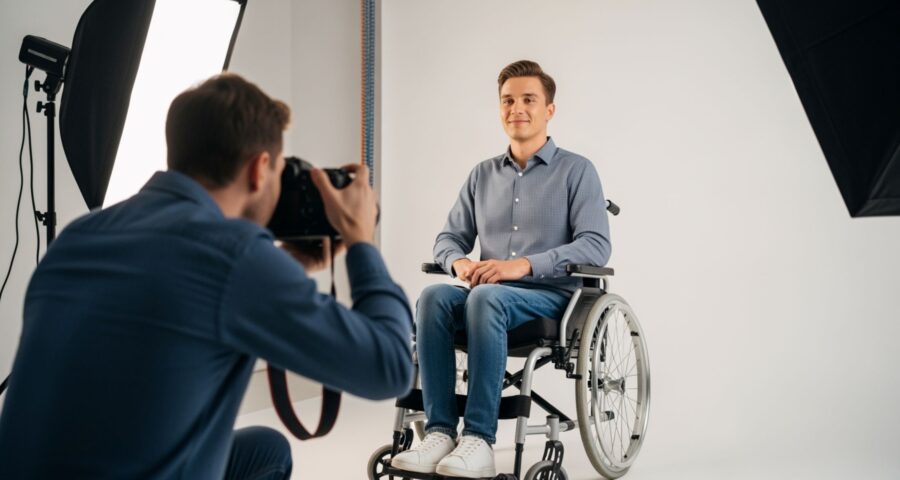
Getting a passport photo taken is usually a simple task, right? You walk into a studio, strike a pose, and voilà—a picture ready for your passport application. But what if you have a disability or a medical condition that makes standard passport photo requirements tricky? Suddenly, something as simple as a photo can feel like a monumental challenge. Don’t worry—we’ve got you covered. This guide will walk you through everything you need to know to get a passport photo that meets government requirements without sacrificing your comfort or safety.
Understanding Passport Photo Requirements
Passport photos might seem like a minor part of the application process, but they are, in fact, one of the most critical elements. Governments worldwide enforce strict rules for these photos because they serve as a primary method of identifying individuals in legal, travel, and security contexts. A small deviation from the required standards can result in a rejected application, delayed processing, or even legal complications. The rules exist to ensure that every photo clearly represents the person applying, eliminating ambiguity and reducing the risk of fraud or identity theft. This is especially important in an age of advanced digital editing and facial recognition systems, where even slight alterations can compromise security measures.
One of the most universally enforced requirements is a plain, light-colored background, usually white or off-white. This rule ensures that the face stands out clearly and avoids distractions that could interfere with automated systems or manual verification processes. Shadows, patterns, or cluttered backgrounds can obscure facial features, making the photo non-compliant. For individuals with disabilities, maintaining a clean and plain background is essential, and modifications such as positioning a wheelchair or mobility device may be allowed, provided they do not interfere with the clarity of the face and shoulders.
Another critical rule involves full visibility of the face, with eyes open and the mouth closed. Passport authorities need to capture all facial features accurately for identification purposes, and anything obstructing the face—like large hats, hair covering the eyes, or certain medical equipment—can result in rejection. People with medical conditions or involuntary movements may face challenges in maintaining a neutral expression or holding still, but allowances and accommodations can often be made. Providing documentation from a medical professional or using specific posing techniques can help ensure that these photos still meet compliance standards.
Finally, the position and framing of the head and shoulders are strictly regulated. The face must be centered, the shoulders visible, and the overall composition symmetrical. This consistency allows authorities to compare photos across different applications and time periods efficiently. Lighting is also crucial—there should be no glare or harsh shadows that obscure features. For applicants with disabilities, understanding these technical details helps them communicate with photographers or passport officials about necessary adjustments, ensuring the resulting image is both compliant and accommodating. Recognizing these fundamental requirements is the first step toward navigating the accommodations process successfully.
Common Challenges People Face
- Difficulty standing or sitting upright for long periods due to mobility issues, chronic pain, or muscular conditions.
- Limited ability to maintain proper posture or balance, making it hard to align the head and shoulders correctly for the photo.
- Inability to hold the head straight or maintain eye contact due to neck or spinal conditions, tremors, or neurological disorders.
- Use of assistive devices such as wheelchairs, walkers, canes, hearing aids, or oxygen tubes, which may interfere with standard photo framing or visibility rules.
- Conditions causing involuntary movements, including tremors, spasms, or other motor control disorders, which make it difficult to stay still for the photo.
- Sensitivity to bright lighting, camera flashes, or certain indoor lighting setups, which can cause discomfort or trigger medical symptoms.
- Facial asymmetry or muscle weakness due to conditions such as Bell’s palsy, stroke, or muscular dystrophy, affecting neutral expression requirements.
- Cognitive or developmental conditions that make it challenging to follow instructions, maintain focus, or understand posing requirements.
- Sensory processing disorders that make certain textures, sounds, or environments stressful, complicating studio or on-site photography.
- Anxiety or claustrophobia triggered by photography studios, cameras, or professional settings, potentially affecting posture or facial expression.
- Skin sensitivities or medical equipment that cannot be temporarily removed for the photo without risking health or safety.
- Temporary medical conditions, such as casts, braces, or recent surgeries, that affect body positioning or accessibility.
- Difficulty wearing standard clothing for passport photos due to medical devices, skin conditions, or therapeutic garments.
- Fatigue or limited endurance from chronic illnesses, requiring shorter or more flexible photo sessions.
- Communication barriers that make it harder to explain needs or request accommodations from photographers or passport authorities.
Know Your Rights and Accommodations
| Country | Governing Authority | Disability Accommodations Allowed | How to Request Accommodations | Notes / Tips |
| United States | U.S. Department of State | Use of assistive devices, modifications to standard photo process | Indicate needs on application, bring documentation | Home visits or in-person appointments may be available in special cases |
| United Kingdom | HM Passport Office | Adjustments for mobility issues, temporary conditions, medical devices | Contact passport office before appointment | Some accommodations may require prior approval and documentation |
| Canada | Passport Canada | Home appointments, assistance with positioning, device allowances | Request via phone or online when scheduling | Ideal for applicants who cannot travel; documentation may be requested |
| Australia | Australian Passport Office | Assistance for medical devices, wheelchair accessibility, head/neck supports | Mention during appointment scheduling | Staff trained for disability accommodations; check specific photo rules |
| India | Passport Seva / Ministry of External Affairs | Exemptions with disability certificate, support for mobility or medical devices | Submit certificate with application or request special appointment | Some regional passport offices have dedicated accessibility support |
Choosing the Right Location
Selecting the right location for your passport photo is a crucial step, especially if you have a disability or medical condition. Not all photo studios are equipped to handle special requirements, and visiting an unprepared studio can lead to stress, discomfort, or even multiple trips. The ideal location should not only be accessible but also provide staff who are trained to assist clients with different mobility levels and medical needs. Planning ahead and researching studios that advertise accessibility options can save time and ensure a smooth, comfortable experience for you.
Accessible passport photo studios are often the first choice for many applicants with disabilities. These studios typically feature wheelchair ramps, wide doorways, and adjustable equipment to accommodate various physical needs. In addition to physical accessibility, many of these studios have staff trained to work with clients who have medical conditions, involuntary movements, or cognitive challenges. Some even offer on-site photography, allowing clients to have the session in a familiar environment within the studio. Choosing a professional studio that prioritizes accessibility increases the chances of capturing a compliant and high-quality photo efficiently.
Home passport photos have become a viable option for people with limited mobility or those who experience stress in public spaces. Taking a photo at home allows you to control your environment fully, use assistive devices without restriction, and reduce anxiety associated with traveling or standing for long periods. To ensure the photo meets passport standards, it’s essential to set up a plain, light-colored background and ensure proper lighting that avoids shadows or glare. Using a tripod, a stable surface for the camera, and natural light can help replicate professional-quality conditions in the comfort of your home.
Mobile photographers are another excellent option for individuals who cannot easily travel to studios or have multiple medical or mobility constraints. These professionals bring all the necessary equipment to your location and are often experienced in working with clients with disabilities. They can adjust lighting, camera angles, and positioning to ensure compliance with passport photo requirements while prioritizing your comfort and safety. Calling ahead and explaining your needs is always recommended, as it allows the photographer to prepare for any special accommodations and reduces stress on the day of the session.
Positioning and Assistive Devices
- Wheelchairs: Position the wheelchair directly in front of a plain, light-colored background. Ensure that the entire face and shoulders are fully visible. Avoid props or background clutter that could obscure identification features.
- Walkers and Canes: If using a walker or cane, ensure it does not block the view of your face or shoulders. Position it to the side or slightly behind you if possible.
- Hearing Aids: Hearing aids can remain in the photo. Do not remove them unless specifically instructed by the passport agency. They do not interfere with identification and are generally accepted.
- Oxygen Tubes: Oxygen tubes may remain in the photo if medically necessary. Always provide documentation or a doctor’s note to explain their presence, as this helps passport authorities accept minor deviations from standard rules.
- Head and Neck Supports: Supports such as neck braces or special pillows are allowed, provided the face remains fully visible. Position yourself so that the device does not obscure facial features.
- Glasses: Glasses are usually removed unless medically necessary. If glasses cannot be removed, provide a doctor’s note explaining why. Ensure there is no glare or reflection on the lenses.
- Prosthetics: Prosthetic limbs or facial devices are allowed if required for medical reasons. Ensure they do not cover the face or head.
- Braces or Casts: Limb braces or casts may remain if removing them would cause discomfort or harm. Position the body so these devices do not interfere with photo composition.
- Minor Involuntary Movements: If you have tremors or other involuntary movements, try multiple shots to capture the clearest photo. Using a tripod or stable surface for the camera helps reduce blur.
- Posture Adjustments: Adjust seating or standing angles as necessary to keep shoulders and face visible. Do not strain your body; comfort is important, and slight deviations are often accepted with documentation.
- Head Tilt or Facial Asymmetry: If unable to hold your head perfectly straight due to medical conditions, note this to the photographer and, if necessary, provide a medical explanation. Slight deviations may be accommodated.
- Medical Documentation: Always bring a doctor’s note explaining any assistive device or condition that affects your positioning. Passport authorities are more likely to approve exceptions with proper documentation.
- Communication with Photographer: Explain your needs before the session. Trained photographers can adjust angles, lighting, and equipment to accommodate assistive devices and ensure compliance with passport photo standards.
- Safety Considerations: Prioritize comfort and safety over rigid adherence to posture. Agencies typically allow minor adjustments for health or mobility reasons.
Lighting and Background Tips
| Lighting/Background Element | Best Practices | Common Mistakes to Avoid | Tips for Disabilities/Medical Conditions | Additional Notes |
| Natural Light | Position yourself near a window with indirect sunlight to illuminate the face evenly | Direct sunlight can create harsh shadows or squinting | Adjust curtains or blinds to reduce glare if sensitive to bright light | Soft, diffused natural light is ideal for clear facial visibility |
| Overhead Lights | Use minimal or no overhead lighting to prevent shadows on the face | Harsh ceiling lights can create dark patches on the face and background | If overhead lighting is unavoidable, use additional side lamps to soften shadows | Adjustable lamps or softbox lights can help control illumination |
| Background | Use plain, light-colored walls (white or off-white) | Busy patterns, textures, or cluttered backgrounds can cause photo rejection | Ensure background is free of furniture, mobility aids, or assistive devices unless medically necessary | White sheets or portable backdrops are convenient alternatives |
| Camera Angle | Keep camera at eye level; adjust camera if you cannot tilt head | Angled shots can distort facial features or make shoulders uneven | Use adjustable tripods or stable surfaces if sitting or using a wheelchair | Take multiple shots to ensure proper alignment and full-face visibility |
| Stability | Use tripod or flat, stable surface to reduce blur | Holding camera by hand can result in motion blur, especially with tremors | Tripod, phone stand, or a helper to hold the camera ensures a sharp image | For multiple attempts, label each shot to select the clearest photo |
Camera Settings and Equipment
When taking a passport photo, having the right camera settings and equipment can make all the difference, even if you’re not a professional photographer. The first consideration is resolution. Passport photos require high-quality images, typically a minimum of 300 dpi, to ensure that all facial features are clearly visible and compliant with government standards. Low-resolution photos can appear blurry or pixelated, leading to rejection. Using a smartphone or digital camera with a high megapixel count is usually sufficient, as long as the image is crisp and detailed.
Framing is another critical aspect. The head and shoulders must be fully visible, with enough space around the head to meet official size requirements. Proper framing ensures that the photo can be cropped correctly without losing essential facial features. For applicants using wheelchairs, walkers, or other assistive devices, framing adjustments may be necessary to keep the face and shoulders centered while maintaining visibility of essential features. Taking multiple shots from slightly different distances and angles can help achieve the perfect framing.
Focus is equally important. The eyes must be sharp and clear, as they are key to identification and facial recognition processes. Blurred eyes or facial features can lead to a photo being rejected. To maintain focus, use autofocus features on cameras or ask a helper to adjust the focus manually. For those with hand tremors or limited mobility, placing the camera on a stable surface or using a tripod can prevent motion blur and ensure that the final image meets passport standards.
Finally, lighting and flash considerations are essential, particularly for individuals sensitive to bright light or camera flashes. Direct flash can cause discomfort, harsh shadows, or glare, which may obscure facial features. Soft, diffused lighting, such as indirect natural light or softbox lights, is preferable. Adjusting the light source to illuminate the face evenly while minimizing shadows ensures that the photo remains clear and compliant. Taking the time to experiment with lighting and camera positioning can significantly improve the quality of the final passport photo.
Leave a Reply