
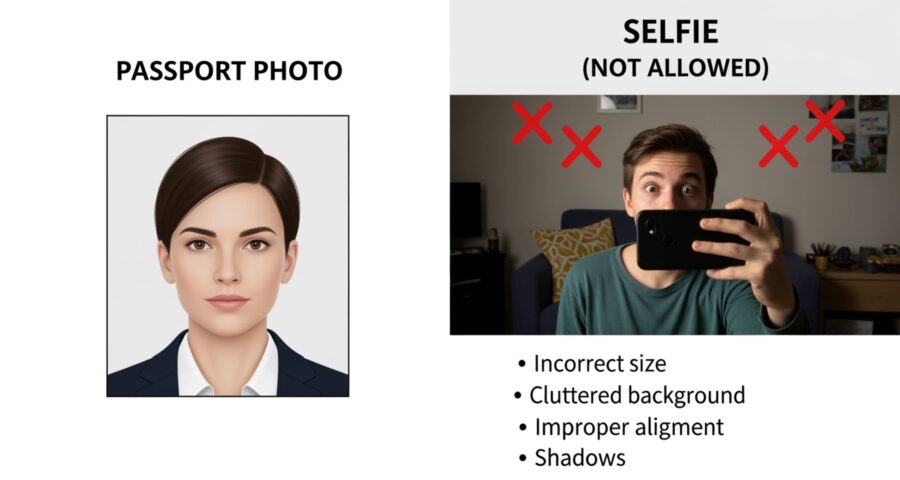
Applying for a passport can feel like a maze sometimes, right? There are forms to fill, fees to pay, and don’t even get me started on the photo requirements. You might be tempted to just snap a quick selfie and call it a day. But here’s the kicker: using a selfie for your passport application is not allowed. Let’s break down why that is, in a way that actually makes sense, without drowning you in legal jargon.
Understanding Passport Photo Requirements
Getting your passport approved isn’t just about having a cute picture. In fact, the photo you submit is one of the most important parts of your application. Passport authorities require a very specific type of photo because it serves as a legal representation of your identity. Unlike casual photos we take for social media or personal use, passport photos are used by officials and automated systems to verify who you are. Even small deviations in facial angle, lighting, or expression can cause delays, or even outright rejection of your application.
The rules for passport photos are designed to make your facial features clearly visible and recognizable. This includes proper head positioning, neutral facial expressions, and a consistent background that avoids distractions. Your eyes must be open and looking directly at the camera, and your face should occupy a precise proportion of the frame. These details might seem minor, but they are critical for biometric systems that compare your passport photo with your face at borders or airports. A casual selfie often fails to meet these standards, which is why it cannot replace a proper passport photo.
Another important factor is photo quality. Passport photos must be high-resolution and free from shadows, glare, or blurring. Poor lighting or pixelation can interfere with the facial recognition software used by border authorities and even human inspection. Additionally, accessories such as hats, sunglasses, or heavily tinted glasses are strictly prohibited because they can obscure important facial features. Even seemingly harmless editing filters, commonly used in selfies, are not allowed because they alter the appearance of your face.
Lastly, these strict requirements also serve a security purpose. Passport photos are not just for identification—they are part of an international system designed to prevent fraud, identity theft, and illegal travel. By adhering to these rules, you ensure that your passport is accepted quickly and that you won’t face issues at customs or immigration. Understanding and following these requirements might take a little extra effort, but it ultimately saves time, prevents frustration, and guarantees that your official documents accurately represent you.
The Role of Passport Photos in Identity Verification
| Feature | Requirement | Purpose | Common Mistakes | Impact if Incorrect |
| Facial Accuracy | Face must be fully visible, centered, and current | Ensures the photo accurately represents the applicant | Tilting the head, using outdated photos, or cropping the face | Biometric mismatches, application rejection |
| Resolution & Clarity | High-resolution, sharp image with no blur | Allows officials and facial recognition systems to detect features | Low-quality camera, blurry selfies, poor lighting | Delays in processing, manual verification needed |
| Background | Plain, light-colored, no patterns or objects | Provides a neutral backdrop for feature detection | Busy rooms, furniture, or outdoor scenery | Photo may be rejected, reduces recognition accuracy |
| Expression & Pose | Neutral expression, eyes open, mouth closed, head straight | Helps automated systems accurately compare facial features | Smiling, tilting head, exaggerated expressions | Passport may be rejected or cause verification issues at borders |
| No Alterations | No filters, editing, hats, or glasses that obscure the face | Maintains true representation of the applicant | Selfie filters, photo retouching, tinted glasses | Security risk, legal noncompliance, possible fines or rejections |
What Are the Official Photo Standards?
- Photo Size: Passport photos must adhere to precise dimensions, usually 2×2 inches (51×51 mm) in most countries like the U.S., U.K., and India. The size ensures that your face occupies the correct proportion of the frame for both human review and automated facial recognition systems. A photo that is too large or too small can cause the application to be rejected.
- Head Position: Your head must be fully visible, centered, and facing straight at the camera. Both ears should ideally be visible, and the face should occupy the recommended portion of the photo. Tilting, turning, or angling your head—even slightly—can distort facial proportions and make it difficult for officials or biometric systems to verify your identity.
- Background: The background must be plain white or off-white with no patterns, textures, or objects. This uniformity ensures that your facial features are easily distinguished from the background. Busy or colorful backgrounds can create shadows or visual distractions, which may cause your photo to be rejected.
- Facial Expression: A neutral expression is mandatory. Your mouth should be closed, and eyes open, without smiling or showing teeth. This consistency allows biometric software to accurately map your face. Even subtle expressions like smirking or raised eyebrows can interfere with the recognition process.
- Lighting: The lighting must be even across your face with no shadows, glare, or reflections on your skin or glasses. Harsh lighting from above or below can create uneven shadows that hide key features, while overexposed or underexposed photos can make your face unrecognizable to automated systems.
- Photo Quality: High-resolution, clear images without graininess, blurriness, or digital noise are required. Photos must not be pixelated, overexposed, or underexposed. Low-quality photos, which are common with casual selfies, are likely to be rejected because they do not provide enough detail for verification.
- No Accessories or Filters: No hats, head coverings (unless for religious purposes), sunglasses, or tinted lenses that obscure facial features. No filters, retouching, or edits are allowed. Alterations can significantly change your appearance, causing problems for both human inspection and automated checks.
- Clothing and Contrast: Wear normal, everyday clothing without uniforms or overly bright patterns that could interfere with contrast. Clothing should not blend into the background, and it should allow the face to remain the primary focus of the photo.
Why Selfies Don’t Make the Cut
Selfies have become a part of daily life, whether it’s for social media, chatting with friends, or just capturing a moment. They’re quick, fun, and let you control how you look. But passport photos are a completely different ballgame. Unlike selfies, they need to accurately reflect your face without any distortions or enhancements. The casual nature of selfies often means they fail to meet the precise standards required by passport authorities, making them unsuitable for official identification.
One of the main issues with selfies is angles. When you tilt your head, hold the camera too close, or snap from above or below, it can distort your facial features. Even slight tilting can make your nose appear larger, your chin smaller, or your eyes uneven. Passport officials and facial recognition systems rely on a consistent, straight-on view of your face, so any angle deviation can cause problems for verification. Selfies simply aren’t designed to meet this requirement.
Lighting is another major problem. Selfies are often taken with uneven light sources, harsh shadows, or overexposure from windows or lamps. This inconsistent lighting can hide or exaggerate facial features, making it difficult for both human inspectors and biometric software to accurately identify you. Professional passport photos, on the other hand, use even lighting to ensure every detail of your face is clearly visible. Shadows, glare, or dim lighting in selfies can all result in rejection of your application.
Finally, the background and editing issues in selfies are a big concern. Most selfies include casual surroundings like furniture, curtains, or decorations that are distracting and unacceptable for official documentation. Additionally, filters, retouching apps, and photo editing—common in selfies—can alter your appearance in subtle ways, creating discrepancies with your real-life face. Passport photos must be a true representation of you, free from artistic or cosmetic alterations. Essentially, while selfies are fun and personal, they fail to meet the legal and technical standards required for a passport photo.
Passport Photos vs. Selfies: A Side-by-Side Comparison
| Feature | Passport Photo | Selfie | Reason for Requirement | Potential Issues if Incorrect |
| Background | Plain, light-colored | Any background, often messy | Neutral backgrounds prevent distractions and improve facial recognition | Busy or patterned backgrounds can cause photo rejection and recognition errors |
| Camera Angle | Straight-on, eye level | Often tilted, angled, or from above/below | A straight-on angle ensures accurate facial proportions | Angled photos distort facial features, causing verification issues |
| Lighting | Even, no shadows or glare | Natural or artificial, inconsistent | Proper lighting ensures all facial features are clearly visible | Shadows, glare, or uneven lighting can hide features and lead to rejection |
| Facial Expression | Neutral, eyes open, mouth closed | Smiling, pouting, or funny faces | Neutral expressions allow biometric systems to correctly map features | Smiling or exaggerated expressions can distort the face and cause mismatch |
| Photo Editing | Not allowed | Often includes filters, retouching | No alterations ensure the photo represents true appearance | Filters and edits can alter features, leading to security concerns and rejection |
| Resolution & Quality | High-resolution, sharp, no grain | Often lower resolution, blurry | Clear, high-quality photos are needed for verification and printing | Low-resolution selfies may be rejected or delay processing |
| Accessories | No hats, glasses with glare, or coverings | Often includes sunglasses, hats, or headphones | Avoiding accessories ensures the face is fully visible | Obstructed eyes or facial features can cause automatic rejection |
| Framing & Size | Head and shoulders visible, proper proportion of face | Variable, often cropped or zoomed | Proper framing ensures the face occupies correct space for recognition | Cropped selfies may cut off key features and fail biometric checks |
| Color Accuracy | True-to-life skin tones, color photo | Often filtered or color-adjusted | Accurate color allows consistent identification across systems | Overly bright, dark, or filtered photos may cause verification errors |
The Importance of Facial Recognition Technology
- Passport photos are designed to work seamlessly with biometric systems, which are increasingly used at airports, border control, and immigration checkpoints around the world. These systems rely on precise, standardized photos to verify your identity quickly and accurately. Any deviation from the official standards can compromise the accuracy of these automated checks.
- Selfies often distort facial features due to angled shots, tilting, or proximity to the camera. This distortion can prevent facial recognition software from mapping critical points on the face, such as the distance between eyes, the shape of the nose, or the contours of the jawline. Even minor deviations can trigger manual inspection, delaying your processing at security checkpoints.
- Inconsistent lighting is another common issue with selfies. Shadows, overexposure, or uneven illumination can obscure key facial features, making it difficult for automated systems to identify you correctly. Biometric software relies on clear, uniform lighting to detect and analyze facial landmarks accurately, which is why professional passport photos always use controlled lighting.
- Head tilts or angled poses, common in casual selfies, can further interfere with facial recognition. These systems expect a straightforward, neutral head position with the face fully visible. Any deviation can result in a mismatch or the system requesting a secondary verification, which may include taking a new photo on the spot or manual comparison with your passport.
- Selfies might pass social media or personal aesthetic tests, but they fail the rigorous biometric standards required for official identification. Passport photos are not just about appearance—they are a critical security measure. Proper photos ensure smooth, quick, and accurate verification, reducing the risk of delays, errors, or even travel restrictions.
- By adhering to the official photo requirements, you help maintain the integrity of biometric security systems. Accurate, high-quality photos reduce human intervention, speed up processing, and improve overall reliability for international travel. This makes your travel experience smoother and minimizes the likelihood of encountering security-related complications.
- Overall, facial recognition technology depends on precision, standardization, and consistency. Selfies, with their casual, creative nature, are inherently unsuitable because they compromise one or more of these requirements. Passport photos, on the other hand, are purpose-built to meet these technical and security standards reliably.
Leave a Reply